Configure an API or compatible connection
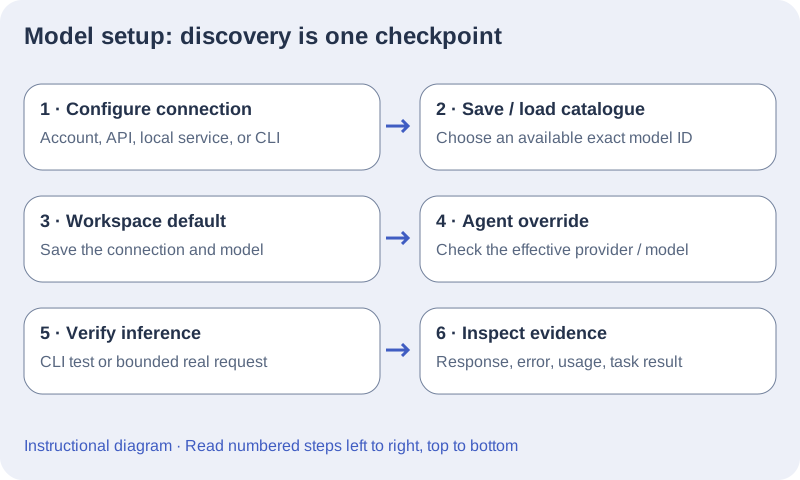
- Obtain a provider API key and billing access through your provider account. A Vopit license or ChatGPT subscription does not provide API billing access.
- Open Settings → Connections → AI connections → API connections and select the actual provider: OpenAI API, Claude API, Mistral API, Mammouth AI or Compatible API. For Claude API and Mammouth AI, Get API key opens the provider page where keys are created. Use Import key file with a .txt or .key file containing only your key; use Replace key file or Remove key when rotating access.
- Keep the provider’s default endpoint unless your approved service requires another; it is under Advanced: endpoint & cost estimates → Endpoint. For Compatible API set Server endpoint explicitly, including its API path. Require HTTPS for non-loopback hosts, without URL credentials, query, or fragment.
- Choose Save & load models and set Connection default model to an available exact ID. With Mammouth AI, choose a text model that supports tool calling for agent work. Use as default changes the workspace connection; simply selecting Configure does not.
- Save settings, confirm the resolved connection under How your agents run, and run a small request. For API and local connections there is no Test response button: Save & load models checks discovery; a real request checks inference.
Command-line connections (Codex CLI, Claude Code, Mistral Vibe, Mammouth Code and Antigravity CLI) are listed under Accounts & CLI. Sign in with the CLI itself, then use Verify installation to check the executable and Test response to check sign-in and inference with a short prompt that counts toward your account usage.
Set an agent override or reasoning effort
- Choose Edit beside an agent in How your agents run, or Edit agent in its inspector. Workspace default inherits the global connection; Individual connection retains its own provider.
- Choose an agent model override only when needed. An empty agent model inherits the connection default; a CLI connection with no selected model can use the CLI’s configured model.
- For Codex CLI and Claude Code, the model control lists a catalogue: Refresh models reloads the Codex catalogue, and Claude Code uses a fixed list. Set Default reasoning effort on the connection, or Reasoning effort on an agent; the agent default inherits the connection, then the CLI configuration. Claude Code offers Low, Medium, High, Xhigh and Max; Codex lists the levels supported by the selected model. For Mistral Vibe, Mammouth Code and Antigravity CLI, enter a model ID or leave it blank to keep the CLI configuration.
- Review the effective engine because changing connections changes the active tools and configuration. Save agent and use a bounded request to verify the effective selection. If a model is unavailable, clear the stale override or choose an available model, save, and retry deliberately.
Set a fast model and request budgets
- Each connection has a Fast model. The Ultra-fast and Balanced speed modes run their quick stages and meeting moderation on it, at low effort. Left empty, Claude Code and Claude API use a Sonnet model; other connections use the connection model. See Speed modes and parallel requests.
- Request budgets and model capabilities sets the Model catalogue timeout (ms) and Connection test timeout (ms). For connections other than CLIs, it also sets the Response token budget, Temperature support and Reasoning capability. Use these when automatic detection from the model name is wrong for your API or local model. Restore connection defaults clears the overrides.
- Provider-specific parameters remain editable per agent. Save settings after changing a connection.
Understand verification status
| Status or action | What it proves | Next check |
|---|---|---|
| Key required / Not checked | No key is saved, or nothing has been checked for this configuration yet. | Import a key, or load models or verify the CLI. |
| Key saved · access not tested / Account connected | Credentials or account connection exist. | Load or refresh models. |
| Models loaded | Model discovery succeeded. | Run a bounded real request. |
| CLI detected · sign-in not tested | Verify installation found the CLI executable. | CLI Test response checks sign-in and inference. |
| Response verified | A short CLI inference succeeded for the checked configuration. | Validate the intended agent task and capabilities. |
Configure optional API and local cost estimates
- In the non-CLI, non-ChatGPT connection, expand Advanced: endpoint & cost estimates.
- Enter Input $ / 1M tokens and Output $ / 1M tokens using current rates for the chosen model. Enter Cached input $ / 1M and Cache write $ / 1M only when known; leaving them blank means unknown.
- Save settings and inspect usage for a completed request. The configured rates estimate cost; they do not control billing, plan limits, or provider invoices.
- Review the rates when changing models or providers. Zero rates can display a zero estimate even when provider charges exist. Reasoning tokens are part of output; do not count them twice.