Infrastructure supports Linux/POSIX servers through SSH, PostgreSQL databases and MySQL/MariaDB databases. Each target has its own connection settings and access policy. Credentials stay in OS-encrypted storage; Vopit and native CLI connections use the same gateway. Other cloud APIs require an additional connector. Targets are configured in Settings → Connections → Infrastructure, which becomes available once the project has a team.
Environment, policies and budgets
- Each target has an Environment (Development, Staging or Production) and an Enabled switch. Agents cannot use a disabled target.
- Each saved operation has a policy: Confirm each execution, Allow for assigned agents, or Disabled. Start destructive operations with Confirm each execution.
- Allow agent-proposed operations is off by default. Leave it off unless the agent must design new exact actions for this target.
- Connection and result budgets bound each target: a 15-second connection timeout and a 100-row SQL sample by default. See Configuration reference for every limit.
- Generate with AI drafts operations from your description. Use the open project's files is available only when the project's READ permission is not set to Never allow; credentials and .env files are excluded.
- A Crank can run a saved operation with the Infrastructure operation action, so a Crank chain can sequence several saved operations under their existing policies.
Connect with SSH
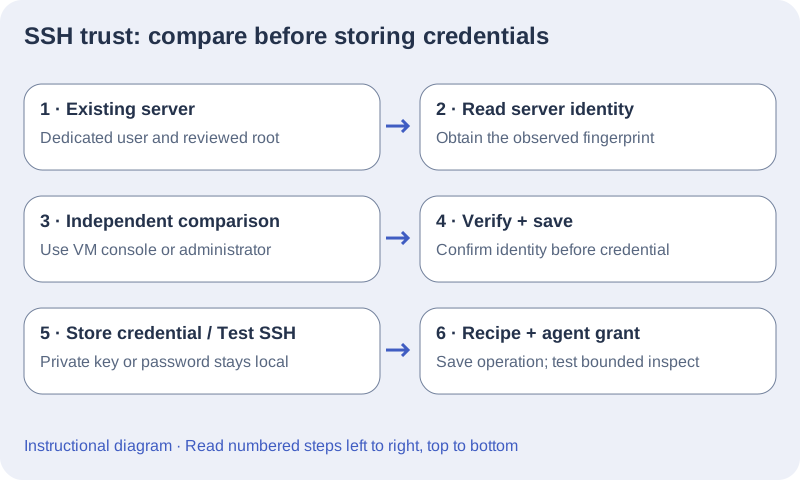
- Create a dedicated server user with only the operating-system privileges the deployment needs. Record its host, port, remote root, and public URL.
- Open Settings → Connections → Infrastructure and enter the connection details. Choose Read server identity, compare the fingerprint with your VM console or administrator, then choose I verified this fingerprint. Reading alone does not trust the server.
- Save the connection with the verified fingerprint before storing a password or importing an OpenSSH private key. For an encrypted key, enter its key passphrase first; this is not the server account password. Choose Test SSH after the credential is stored.
- Import the original private key, not a .pub file. PuTTY PPK v3 is rejected; export an OpenSSH key with PuTTYgen if needed. Changing the host, port, user, or authentication method clears the stored credential.
Grant a connection to an agent
Agent infrastructure access is independent of project access. Choose the specific saved connection for the agent and save it before running a request. Stop active requests before changing infrastructure access. Granting listing access does not grant an operation, and instructions cannot grant a server.
Connect PostgreSQL or MySQL / MariaDB
- Add a target and select its database connector. Enter host, port, database name and a dedicated database role. PostgreSQL defaults to port 5432 and MySQL to 3306.
- Keep TLS certificate verification enabled. Add a public PEM CA certificate if the service uses a private certificate authority. Never paste a private key into this field. For verified MySQL TLS, use the DNS hostname matching the certificate rather than a literal IP.
- Save the target, store its password securely, and choose Test database. Changing database identity or TLS settings clears the previous credential.
- Add SQL checks or migrations and assign the target to the appropriate agent. The database role enforces access; purpose labels do not create a read-only sandbox. MySQL executes one statement per operation. Use SSH to run framework migration scripts.
Let an agent propose project-specific actions
Operations have freely editable purposes: certificate renewal, schema migration, backup or another project task. Enable Allow agent-proposed operations on the target, then enable Propose new operations and grant the target in the agent editor. infra_run submits an exact command, SQL statement or upload for approval every time. Project-wide permissions do not bypass this approval. save=true also requests permission to retain a successful recipe with the Confirm each execution policy. Targets keep proposals disabled until explicitly enabled.
| Execution | Purpose | Approval guidance |
|---|---|---|
| SSH command | Run project deployment, SSL renewal, backup or maintenance automation. | Use Confirm each execution unless a tightly scoped recipe is approved for Allow for assigned agents. |
| Database SQL | Inspect schema or execute an approved migration. | Review SQL and database-role privileges. Plan backups and rollback; DDL is not universally reversible. |
| SSH upload | Transfer one project artifact within the target upload limit. | Review local and remote paths first. |
| Agent proposal | Execute a new exact action adapted to the assigned project. | Always requires approval and target opt-in. |
Configure certificate renewal or a database migration
- For SSL renewal, use an SSH target whose server account can invoke a reviewed renewal script or narrowly scoped administrator-approved command. Name the recipe clearly and set its purpose to ssl-renewal. Follow renewal with certificate and public HTTPS verification.
- For direct SQL migrations, create a PostgreSQL or MySQL/MariaDB target with a dedicated role and verified TLS. Review the SQL, backups and rollback strategy; changing a schema is not necessarily reversible.
- For an action the agent must design, enable target proposals and the agent capability, assign the target, then request the bounded task. Review the exact command or SQL displayed before execution. Saving a successful proposal retains an Ask recipe.
- A missing or declined action does not authorize another transport or reading credentials. Continue independent permitted work and report the precise missing target, privilege or approval.
Save operations and verify the DevOps grant
- On the server, create the deployment root and each upload parent directory with ownership suitable for the dedicated SSH user. Confirm the required release scripts already exist.
- In the saved connection, add operations with a unique ID, label, kind, policy, command or upload paths, and timeout. Start destructive operations with Ask. Save the connection.
- Create or edit a DevOps-template agent, assign this saved connection in infrastructure access, and save the agent. A template alone does not confer access.
- Run a bounded inspection request using only a reviewed inspect operation. Approve it if policy is Ask. Verify the ticket records the intended server and operation before allowing a deployment.
- When an operation is unavailable, check connection enabled state, the saved agent grant, operation policy, and recipe ID. A public URL is a verification target, not SSH authentication or a privilege grant.
Match an action to a supported connector
The current built-in connectors are POSIX SSH/SFTP, PostgreSQL and MySQL/MariaDB. SSH commands require a POSIX shell; native Windows SSH/PowerShell and IIS are not implemented by this adapter. Kubernetes, Docker and cloud services can be operated through installed tools on an approved POSIX runner, but that does not create a native cloud/Kubernetes connector. Confirm tooling and the runner identity before proposing commands. SQL targets do not transfer files, and MySQL runs one statement per operation.
Generate operations using the project sources
- In the target editor choose Generate with AI. Confirm the active connection/model and describe actual tooling, directories and intended actions.
- Use the open project's files is enabled by default. It is unavailable when the project Read permission is set to Never allow. When included, the connected model selects relevant permitted files and receives bounded excerpts in which conventional inline secrets, such as private keys, passwords, tokens and URL credentials, are masked; the target credential, .env files, private keys and internal storage are excluded. Turn this off for description/target-metadata-only generation.
- Review consulted paths, excerpt/partial-context notices and assumptions. This is local source inspection, not a live remote server or database inventory. Missing or excluded sources require a more precise description or configuration.
- Select proposed operations, add them to the editor, adjust paths/commands/timeouts and Save connection. Generation does not execute them or grant the target to DevOps.
- Test a reviewed inspection action, then explicitly assign target access to the agent and enable proposals if future exact actions are needed.
Target settings include connector, environment, identity, public URL, SSH root or database, TLS/CA settings, operation policies and runtime/result budgets. SSH trust requires an independently verified SHA256 fingerprint. Verified MySQL TLS requires a DNS hostname matching the certificate. Database targets execute SQL and do not upload artifacts; credentials must be stored separately in secure OS storage. An SSH upload is written to a temporary file and then renamed; it does not overwrite an existing remote file, so give each release a new destination filename.