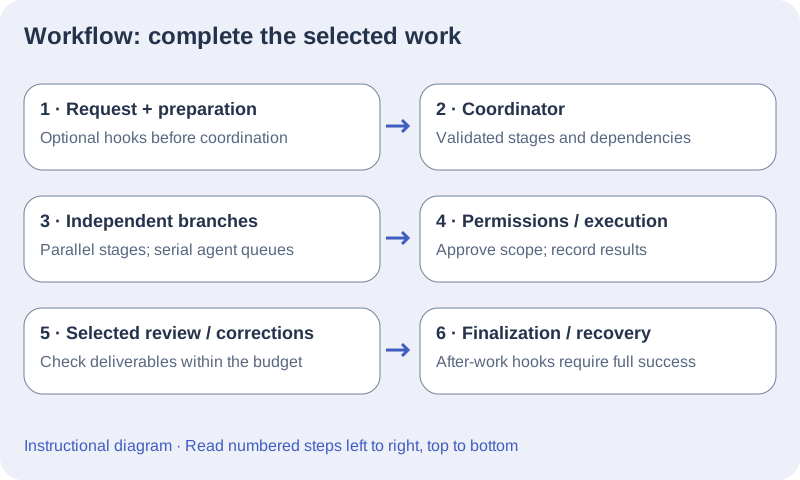
Vopit creates a validated workflow from the request and enabled team. Nodes are stages and edges express success, failure, or always dependencies. Independent branches can run in parallel; each agent still processes its own queue serially.
Read workflow behavior
- Ordinary workflow dependencies are acyclic and every node must be reachable. Failure correction loops are separately bounded. The schema allows at most 16 nodes and 40 edges; the coordinator defaults to 12 nodes.
- The engine records handoffs and checkpoints. Completed stages are retained across a recovery when a different branch fails.
- A partial request has one of two causes. Implementation was saved but the review budget ran out: Resume request continues the pending corrections with a fresh review budget. Or the work finished while some blockers were not resolved by any later stage: the request lists its Open points, and Fix open points asks the team to fix only those in a new request. Inspect the ticket and evidence before retrying.
- The header speed mode changes how much of the workflow runs. Big brain, the default, runs your models, planning, review and Git stages as configured. Balanced runs coordination and Git stages on the fast model and allows at most one correction round. Ultra-fast runs every stage once on the fast model at low effort, with no correction rounds and no automatic Git stages. The mode is read when each stage starts. See Speed modes and parallel requests.
Configure a follow-up agent
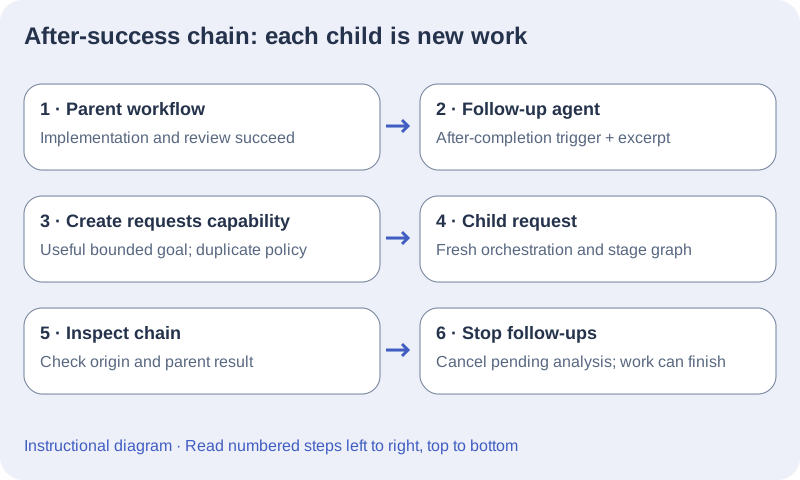
A follow-up agent runs after a request succeeds and looks for the next useful task. It proposes that task as a board card, which waits for your approval unless the agent is set to Full auto.
- Enable the Ticketer, or create an agent from the Ticketer template. It reads the board, then adds at most one card to the Backlog with the scope, the evidence and the acceptance criteria. It proposes nothing already on the board, in any column, and the card shows which request it follows. Nothing runs until you approve the card (see Board). For a fully automatic chain, turn on Automation → Full auto: its cards need no approval; with the board’s Auto-run on, the team then starts its cards on its own.
- An agent with the Create requests capability works through the board too: once the current request succeeds, each task it submits becomes a card in To do, which continues the request chain when it starts. Full auto applies to it in the same way.
- In Automation, When to run offers When assigned by the orchestrator, After a request completes successfully, and Before / after project work (see Run a teammate before or after project work below). For after-success behavior, provide preparation or verdict output.
- Set the previous-result excerpt size and the per-stage limit of new cards or requests (one by default). Create requests also has a duplicate policy. The values remain editable and revisions are retained.
- Stop follow-ups to remove pending analysis tickets while ordinary work finishes. Follow-ups run only after the whole workflow succeeds, including review work.
Trace and stop a follow-up chain
- The tasks an agent proposes, with the Ticketer’s board actions or with Create requests, become board cards. Each waits for your approval unless the agent is set to Full auto; with the board’s Auto-run on, the chain then continues on its own.
- Enable Create requests only on a teammate that should create bounded new work. In its Automation tab, describe what constitutes a useful next task and when no task should be created.
- For after-success analysis, select After a request completes successfully, and use preparation or verdict rather than workflow output.
- Run one small parent request. Inspect the parent result and new request’s origin in the Requests list; each child is routed as a fresh request with its own workflow.
- Open the Request follow-ups panel to inspect the chain and choose Stop follow-ups when the objective is met. Pending analysis tickets are cancelled and the chain’s cards not started yet go back to awaiting approval; ordinary running work can finish.
- If a parent fails or is cancelled, inspect and recover that request deliberately. After-success analysis requires a completed workflow, including its review stages. Do not restart the whole chain merely to repeat already saved changes.
Run a teammate before or after project work
- Choose Before / after project work in the agent Automation tab. Use preparation or verdict output, enable the required phases, and set its lifecycle priority; lower values prepare first.
- Edit the before/after instructions and required successful actions. The Git Manager template requires git_prepare before work and git_commit afterwards, but every agent can use the same lifecycle settings.
- Preparation runs before the coordinator chooses the workflow. After-work stages run once the workflow has run to its end, including selected correction/review work, and also when it finished with open points. A failed preparation prevents ordinary work from starting. Ultra-fast speed mode skips before- and after-work stages.
- Inspect the queued tickets and handoffs. A required action must actually succeed; a model statement alone does not satisfy that requirement.
- Stop follow-ups stops child creation and pending after-success analysis; it retains lifecycle finalization for the current successful work. Stop request cancels the request itself.
Preparation priority and coordinator priority are separate controls. Enabled team/coordinator and lifecycle IDs are captured when the request is created. When a request that prepares Git (a before-work agent or an already prepared branch) would share the project folder with another running request, it runs in its own Git worktree by default. If a worktree is not possible, it waits and shows the reason. Requests without Git preparation, other projects and independent workflow nodes can run concurrently. External editors and terminals are not isolated. See Speed modes and parallel requests and Git Manager: branches and request commits.